Why did I build it?
In visa consulting, moving an application forward is more than changing its status. The right information has to be collected from the applicant, missing documents completed, review responsibility assigned and payment status tracked. When this information is scattered across spreadsheets and messages, it becomes hard to see why a file is stuck.
I built Visa Platform to bring what the applicant needs to do and the consultancy team's operations together around a single file. The system consists of a public area where visitors explore visa options, a personal workspace for applicants and a prioritised operations panel for the team.
From visa options to an application
Visitors can browse the services on country and visa programme pages. Programmes show processing time, number of entries, length of stay, document requirements and, where published, fees. Pricing keeps the service fee and the official government fee as separate fields.
A check based on nationality and destination gives initial guidance on visa requirements, using the rules stored in the system. The result can be no visa required, an electronic travel authorisation, visa required or expert review. Combinations without a defined rule are sent to expert review. Rules can also store a source link and a review date.
The details a visitor enters to continue with an application carry over, in the same browser session, to the file creation form after sign-up or sign-in. Requests sent through the contact form are saved and create a notification for administrators.
Controlled file opening and the applicant workspace
A file created by an applicant first goes into a preliminary review. Once the team completes this step and opens the file, the questionnaire, document uploads and payment become available together. An administrator can also create a file directly on behalf of an existing client and assign a responsible consultant.
In their account, applicants can see their files, the current stage, the next step and the target date. The file's overview, questionnaire, documents, messages, activity and payment sections keep everything about the application in one place. Internal tasks and notes stay in the consultants' workspace.
Questionnaires tied to the visa programme
Forms built from a question bank are generated according to the information each visa programme needs. Field types such as text, date, number, choice and yes/no are supported. Conditional questions appear based on earlier answers, so applicants only fill in the fields that apply to them.
Answers are saved automatically while typing, and the save status is shown to the user. When the form is submitted, visible required questions and field types are validated on the server. The team can review the submitted form, mark it as reviewed or ask for corrections with a comment. After a correction request, the applicant can submit the form again.
Each file keeps the version of the questionnaire it started with. Even if the question bank changes later, the questions, conditions and saved answers of an existing application stay with that file's version. This keeps ongoing files safe from later edits to the catalogue.
Document collection, review and additional requests
When a file is created, the active document requirements of the visa programme are copied into the application. The applicant uploads a file for each requested document, and the team accepts or rejects each upload. Document progress and missing requirements are visible inside the file.
Consultants can open additional document requests specific to a file. Each request can have a title and description, and a request group can have a deadline. The requester and the time of the request are recorded, and a notification is created for the applicant. When an additional document is needed, a file under review can be moved back to the awaiting-documents stage.
The document inbox brings requirements from different files into a single list. Expected, awaiting review, overdue and completed documents can be filtered, and you can search by file number, client or document title.
Uploaded documents are served through access-controlled downloads rather than public file links. File type and size checks are applied on upload.
An operations panel for the team's daily work
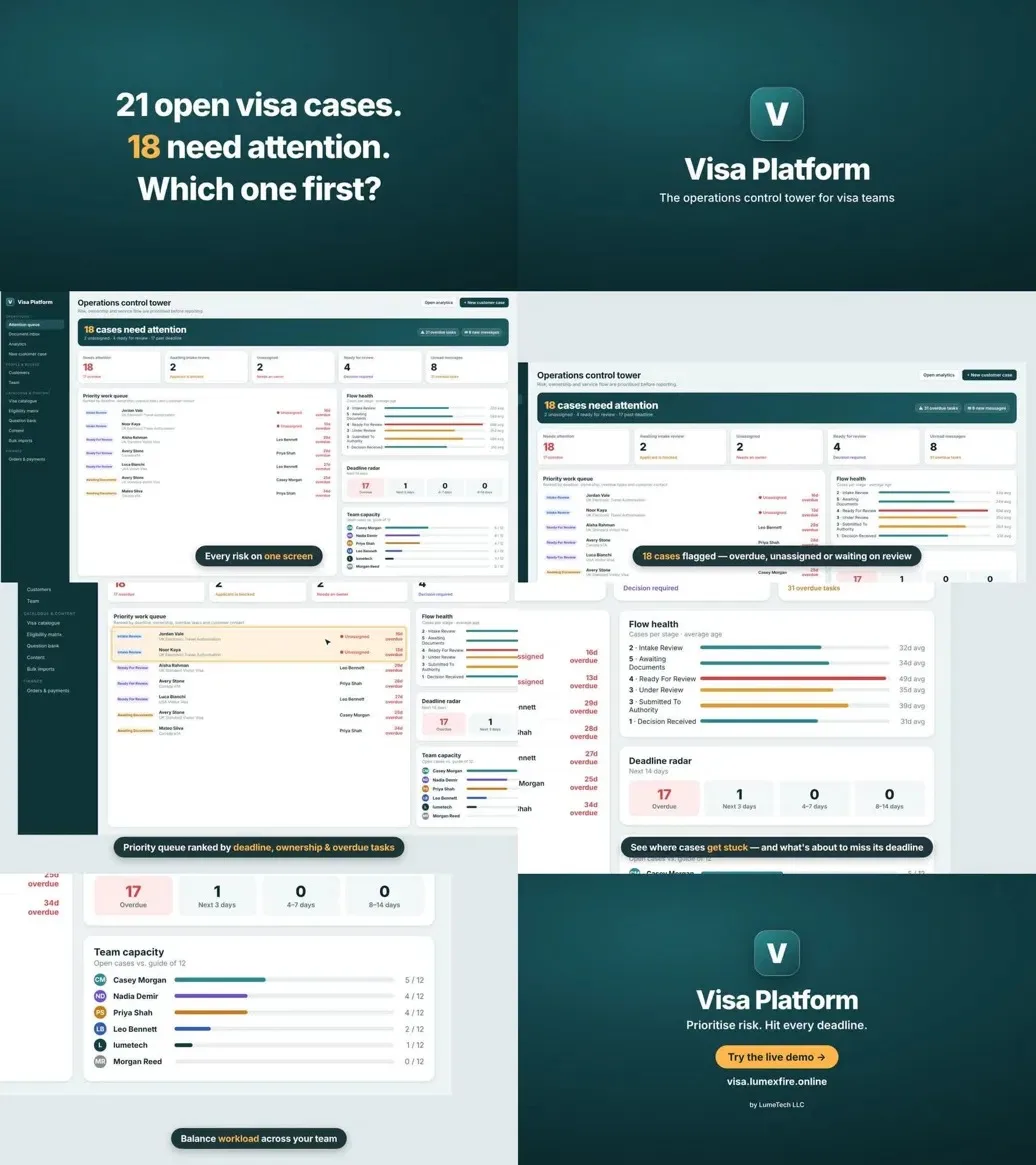
The operations panel makes the work that needs attention visible. Files awaiting preliminary review or without an assigned consultant, upcoming and missed deadlines, applications ready for review and overdue tasks can all be tracked from the panel.
The priority work queue ranks files using signals such as deadline, assignment, readiness for review, overdue tasks and time since the last update. The team can also see which signals make a file a priority.
The deadline radar shows overdue files and target dates in the next 0–3, 4–7 and 8–14 days in separate groups. The flow view shows file counts by status and the time since the last update. In the team view, consultants' open caseloads and risk indicators can be compared.
The panel also shows the number of files opened and completed in the last seven days, and the average completion time of recently completed files. The all-files table supports search, status filters and pagination.
In-file communication and teamwork
Applicants and authorised team members can message each other within the file. Consultants can create operational tasks and track their priority, deadline and status. Internal notes keep the team's assessments separate from the applicant's messages.
Actions such as opening a file, assigning a consultant, status changes, document uploads and reviews, form submissions and additional document requests are recorded in the activity history. When you come back to a file, you can see what has happened along the way.
A workflow with defined stages
Files move through preliminary review, awaiting documents, ready for review, under review, marked as submitted to the authorities, decision received and completed. At suitable stages there are options to withdraw the file or move it back to awaiting documents. Transitions follow the defined workflow rules.
By evaluating form submissions and document approvals, the system can automatically move a file to ready for review. When new information or additional documents are needed, it can return to a stage where the applicant has to act. Paid files require payment confirmation before they can move into review. The description of the next step is also updated according to the file's status.
Order and payment tracking
When an application is created, an order record is prepared from the service fee and any applicable official fees. Prices are stored as they were at the time of the order, so later price changes in the catalogue do not change an existing order. Official fees to be paid at the visa centre are handled separately from the amount collected online.
Applicants can see the total amount and payment status in their file. Administrators can review the client, file, fee items and payment attempts in the order list. The Stripe Checkout integration sets the payment amount on the server and processes the payment result through verified webhook notifications. Checks prevent the same notification from being processed twice.
Client, team and service management
In the admin area, clients can be searched and their file history reviewed. Team screens show consultants' roles, account status, strong authentication details and assigned files. An authorised administrator can change another team member's role or suspend their access.
The visa catalogue is where programme details, related countries, fees, processing and stay information and active status are managed. The eligibility matrix stores rules, sources and review dates for country and nationality combinations. The question bank manages the questions, field types and conditions attached to programmes.
Catalogue and question data can be imported in bulk from XLSX, CSV or JSON files. Downloadable Excel templates and column descriptions help with data preparation. A dry-run option validates the file without applying changes, and the result reports created, updated, skipped and failed records.
Multilingual content and interface
The application has language selection and localisation for English, Turkish, German, French and Spanish. The language preference is kept in the profile for signed-in users and in a browser cookie for visitors.
Home page texts can be edited from the admin screen. Translation jobs can be started for the interface, home page, catalogue, document requirements and question content. A translation memory lets the same text be reused, and when the source text changes, the freshness of related translations is tracked. Content without a translation falls back to the English source text.
Automatic translation is limited to application and service content. Application answers, uploaded private documents, messages and internal notes are never sent to this content translation process.
Analytics and management visibility
The analytics screen shows trends in opened and completed files for 30-day, 90-day and 12-month periods. The status breakdown and each consultant's open caseload complete the overview of operations. The finance section shows total revenue from successfully verified payments and how it is spread over time.
Technical scope
I built the server side with Laravel 13 and the interface with Vue 3, Inertia 3 and TypeScript. The interface uses Tailwind CSS 4 and the data layer uses PostgreSQL. Redis and Laravel Horizon handle queued jobs and monitoring.
Authorisation is enforced on the server based on the administrator, consultant and applicant roles, file ownership and consultant assignment. Team accounts have a strong authentication flow with TOTP or passkeys. Rules such as private document access, form versioning, keeping prices from the time of the order and preventing payment notifications from being processed twice are also part of this design.
As an example of custom software that brings the client's application process and the team's daily operations onto the same data model, the project shows my experience building a client portal, an admin panel, a form engine, a document workflow and a payment integration.
Live demo
In the live demo you can explore the operations panel, file workspace, document inbox, client and team screens, catalogue management and analytics with sample data: visa.lumexfire.online
Release note: The demo records do not represent real clients or production performance. Payment records in the demo do not mean that real card payments were verified in this review.